Embarking on the journey of developing a Software as a Service (SaaS) Customer Relationship Management (CRM) application is an exciting endeavor that promises to revolutionize how businesses manage their interactions and nurture client relationships. This comprehensive guide will navigate you through the intricate process, from grasping the fundamental concepts of SaaS and CRM to architecting, building, and deploying a robust, scalable, and user-centric platform.
Prepare to unlock the secrets behind creating a powerful tool that addresses common business challenges and fosters growth.
We will delve into the essential planning stages, including feature prioritization and user experience design, followed by a deep dive into the technical aspects such as selecting the right technology stack, database management, and API integrations. Furthermore, we will explore the practical implementation of core CRM functionalities, the critical steps for deployment and scaling, and the nuances of user management and customization.
This exploration extends to optimizing integrations, crafting an intuitive user interface, ensuring stringent security and data privacy, and establishing effective monetization strategies.
Understanding the Core Concept of a SaaS CRM
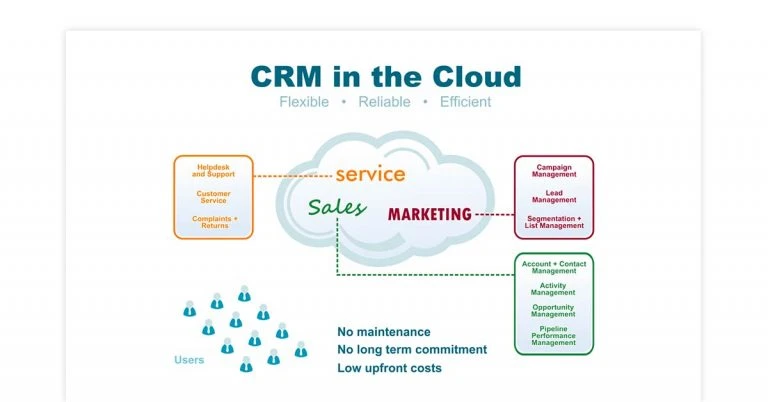
Building a Software as a Service (SaaS) Customer Relationship Management (CRM) application is an exciting endeavor that addresses a critical business need. At its heart, a SaaS CRM is designed to streamline how businesses manage their interactions with current and potential customers. This approach leverages cloud technology to deliver powerful tools accessible from anywhere, fostering efficiency and growth.The fundamental principle of SaaS in the context of CRM is to provide a comprehensive solution over the internet, eliminating the need for on-premises installation and maintenance.
This model shifts the burden of infrastructure management to the provider, allowing businesses to focus on their core operations. Users subscribe to the service, gaining access to a suite of features that help them organize, track, and analyze customer data.
SaaS Principles in CRM
Software as a Service (SaaS) fundamentally redefines software delivery and usage. In the CRM domain, this translates to a subscription-based model where the CRM software is hosted by the vendor and accessed by customers via a web browser or dedicated application. Key aspects include:
- Subscription Model: Instead of purchasing perpetual licenses, businesses pay a recurring fee, typically monthly or annually, for access to the CRM software and its updates.
- Cloud-Based Access: Users can log in and use the CRM from any device with an internet connection, promoting flexibility and remote work capabilities.
- Automatic Updates and Maintenance: The SaaS provider handles all software updates, security patches, and server maintenance, ensuring the application is always current and secure without IT intervention from the client’s side.
- Scalability: Businesses can easily scale their usage up or down based on their evolving needs, adding or removing users and features as required.
- Data Security and Reliability: Reputable SaaS providers invest heavily in robust security measures and redundant infrastructure to ensure data integrity and service availability.
Primary Functions and Benefits of a CRM Application
A CRM application is a strategic tool designed to enhance customer relationships, drive sales, and improve customer service. Its primary functions revolve around centralizing customer information and automating various customer-facing processes. The benefits derived from effectively utilizing a CRM are substantial and can significantly impact a business’s bottom line.The core functions of a CRM system are designed to provide a holistic view of the customer journey.
These functions, when executed efficiently, lead to tangible business advantages.
Key CRM Functions
The operational capabilities of a CRM are diverse, aiming to cover the entire spectrum of customer interaction.
- Contact Management: Storing and organizing detailed information about leads, prospects, and existing customers, including contact details, communication history, and social media profiles.
- Lead Management: Tracking potential customers from initial contact through to qualification, nurturing them with targeted communications.
- Sales Pipeline Management: Visualizing and managing the sales process, from identifying opportunities to closing deals, with clear stages and associated activities.
- Opportunity Tracking: Monitoring specific sales deals, including potential revenue, probability of closing, and next steps.
- Task and Activity Management: Scheduling and managing follow-up activities, appointments, and communications with customers.
- Reporting and Analytics: Generating insights into sales performance, customer behavior, and marketing campaign effectiveness through customizable dashboards and reports.
- Customer Service and Support: Managing customer inquiries, issues, and support tickets, ensuring timely and effective resolution.
- Marketing Automation: Automating repetitive marketing tasks, such as email campaigns, social media posting, and lead nurturing.
Key CRM Benefits
The strategic advantages of implementing a CRM are multifaceted, contributing to improved efficiency, increased revenue, and enhanced customer satisfaction.
- Improved Customer Retention: By understanding customer needs and providing personalized experiences, businesses can foster loyalty and reduce churn.
- Increased Sales Productivity: Automation of tasks and better organization of leads and opportunities allow sales teams to focus on selling.
- Enhanced Customer Satisfaction: Faster response times, personalized service, and proactive problem-solving lead to happier customers.
- Better Data-Driven Decision Making: Access to comprehensive customer data and insightful reports enables more informed strategic choices.
- Streamlined Communication: Centralized customer information ensures all team members have a consistent understanding of customer interactions.
- Higher Conversion Rates: Effective lead nurturing and sales pipeline management can significantly improve the conversion of prospects into paying customers.
- Reduced Operational Costs: Automation of processes and improved efficiency can lead to lower overheads.
Typical User Roles and Their Interactions
A SaaS CRM application is designed to serve various individuals within an organization, each with distinct roles and responsibilities. The system facilitates collaboration and information sharing across these roles, creating a unified approach to customer management.Understanding how different users interact with the CRM is crucial for designing an intuitive and effective application. Each role leverages specific features to achieve their objectives.
Common User Roles
The user base of a CRM typically spans across sales, marketing, customer service, and management.
- Sales Representatives: These users are on the front lines, managing leads, tracking opportunities, logging activities, and updating customer contact information. Their primary goal is to close deals.
- Sales Managers: They oversee sales teams, monitor performance, analyze pipeline data, forecast sales, and assign leads. They rely heavily on CRM reports and dashboards.
- Marketing Professionals: These users leverage the CRM for campaign management, lead generation, segmentation of customer lists for targeted outreach, and tracking marketing ROI.
- Customer Service Agents: They use the CRM to manage support tickets, track customer issues, access customer history for context, and ensure prompt resolution of queries.
- Customer Service Managers: Similar to sales managers, they monitor team performance, analyze support trends, and ensure customer satisfaction levels are met.
- Executives/Management: High-level stakeholders use the CRM for strategic overview, understanding overall business health, identifying growth opportunities, and assessing market trends.
The interaction patterns are often sequential and collaborative. For example, a marketing professional might generate a lead, which is then passed to a sales representative. The sales representative works the lead, logging all interactions. If a deal is closed, customer service might then engage with that customer for post-sale support, with all information being accessible to all relevant parties.
Common Business Challenges Addressed by SaaS CRM
Businesses today face numerous hurdles in managing customer relationships effectively. A well-implemented SaaS CRM is a powerful solution that directly tackles these common pain points, leading to more robust and sustainable growth.These challenges are pervasive across industries and can significantly hinder a company’s ability to compete and thrive. A SaaS CRM provides a structured approach to overcome them.
Key Business Challenges and CRM Solutions
The problems faced by businesses in managing customer interactions are varied, but a CRM offers targeted solutions.
- Fragmented Customer Data: Without a centralized system, customer information is often scattered across spreadsheets, emails, and individual notes, leading to inconsistencies and missed opportunities. A CRM consolidates all this data into a single, accessible database.
- Inefficient Sales Processes: Manual tracking of leads, lack of standardized follow-up procedures, and poor visibility into the sales pipeline can result in lost deals and wasted effort. A CRM automates workflows, provides pipeline visualization, and facilitates consistent follow-up.
- Poor Customer Service: Inconsistent or slow responses to customer inquiries, lack of context regarding past interactions, and difficulty in tracking issues lead to customer frustration. A CRM provides a unified view of customer history and streamlines support ticket management.
- Lack of Insight into Customer Behavior: Without analytics, businesses struggle to understand what drives customer purchasing decisions, their preferences, or their lifetime value. CRM reporting and analytics provide deep insights into customer trends and behaviors.
- Difficulty in Scaling Operations: As a business grows, managing an increasing volume of customer interactions manually becomes unmanageable. A SaaS CRM offers scalability, allowing businesses to adapt to growth without a proportional increase in administrative overhead.
- Missed Marketing Opportunities: Inability to segment audiences effectively or track campaign performance leads to inefficient marketing spend and low conversion rates. A CRM enables targeted marketing campaigns and provides clear ROI measurement.
- Low Employee Productivity: Repetitive manual tasks, difficulty finding information, and inefficient workflows detract from core job functions. A CRM automates many of these tasks and centralizes information, freeing up employees to focus on higher-value activities.
“A CRM is not just a tool; it’s a strategy for managing all your company’s relationships and interactions with customers and potential customers.”
Technical Stack and Development Considerations
Building a robust and scalable SaaS CRM application requires careful selection of the right technologies. This section delves into the essential components of your technical stack, from programming languages and databases to integration strategies and security measures, ensuring a solid foundation for your application.Choosing the appropriate technical stack is paramount for the success of any SaaS CRM. It influences development speed, scalability, maintainability, and overall cost.
We will explore the key considerations for each layer of the application.
Programming Languages and Frameworks
The selection of programming languages and frameworks directly impacts development efficiency and the application’s performance. Modern web development offers a variety of powerful options, each with its strengths and community support.Popular choices for building web applications include:
- JavaScript (with Node.js for backend): Highly versatile, enabling full-stack development with a single language. Frameworks like React, Angular, and Vue.js are excellent for building dynamic user interfaces, while Node.js allows for efficient server-side logic.
- Python: Known for its readability and extensive libraries, Python is a strong contender. Frameworks such as Django and Flask provide robust structures for web development, making them suitable for complex applications like CRMs.
- Ruby (with Ruby on Rails): Ruby on Rails is celebrated for its convention-over-configuration approach, which can significantly speed up development time for feature-rich applications.
- Java: A mature and widely adopted language, Java with frameworks like Spring offers excellent performance and scalability, often preferred for enterprise-level applications.
- PHP (with Laravel or Symfony): A long-standing player in web development, PHP, particularly with modern frameworks like Laravel, remains a viable and powerful option for building complex web applications.
Database Choices
The database is the backbone of your CRM, responsible for storing and managing all customer data, interactions, and related information. The choice of database significantly impacts performance, scalability, and data integrity.When selecting a database for a SaaS CRM, consider the nature of your data and your expected growth:
- Relational Databases (SQL): These are ideal for structured data and complex relationships, ensuring data consistency and integrity.
- PostgreSQL: A powerful, open-source object-relational database system known for its reliability, feature robustness, and extensibility. It’s an excellent choice for handling complex queries and large datasets common in CRMs.
- MySQL: Another popular open-source relational database, MySQL is widely used for its performance, ease of use, and strong community support.
- Microsoft SQL Server: A robust commercial option, often chosen by organizations already invested in the Microsoft ecosystem.
- NoSQL Databases: These offer flexibility and scalability for handling unstructured or semi-structured data, and can be beneficial for specific use cases within a CRM.
- MongoDB: A popular document-oriented NoSQL database, well-suited for storing flexible data structures like customer profiles with varying attributes.
- Cassandra: A highly scalable, distributed NoSQL database designed for handling large amounts of data across many commodity servers, providing high availability with no single point of failure.
Many SaaS CRMs employ a hybrid approach, using a relational database for core structured data and a NoSQL database for specific features like activity logs or document storage.
The Role of APIs
APIs (Application Programming Interfaces) are crucial for enabling your SaaS CRM to communicate with other software and services. They act as the connectors that allow your CRM to exchange data and functionality, creating a more integrated and powerful business ecosystem.APIs are fundamental for CRM integration because they:
- Facilitate Data Synchronization: APIs allow your CRM to pull data from or push data to other business tools, such as marketing automation platforms, accounting software, or customer support systems, ensuring a single source of truth for customer information.
- Automate Workflows: By integrating with other applications, APIs enable automated workflows. For example, a new lead captured in a marketing tool can be automatically created as a contact in the CRM.
- Extend Functionality: APIs allow for the integration of third-party services, such as payment gateways, mapping services, or communication platforms, thereby extending the capabilities of your CRM without having to build everything from scratch.
- Enhance User Experience: When users can access and manage data from various tools within a single CRM interface, their productivity and satisfaction increase.
RESTful APIs are a common standard for web service communication due to their statelessness, simplicity, and scalability. When designing your CRM, consider building a comprehensive API that allows for deep integration with other essential business applications.
Security Best Practices
Security is not an afterthought; it must be woven into the fabric of your SaaS CRM development from the outset. Protecting sensitive customer data is paramount for building trust and maintaining compliance.Implementing robust security measures involves several key practices:
- Data Encryption: Encrypt data both in transit (using protocols like HTTPS/TLS) and at rest (using database-level encryption or application-level encryption) to protect it from unauthorized access.
- Regular Security Audits and Penetration Testing: Conduct frequent vulnerability assessments and penetration tests to identify and address potential security weaknesses before they can be exploited.
- Secure Coding Practices: Adhere to secure coding guidelines to prevent common vulnerabilities such as SQL injection, cross-site scripting (XSS), and cross-site request forgery (CSRF). Frameworks often provide built-in protections against these.
- Least Privilege Principle: Grant users and systems only the minimum permissions necessary to perform their tasks, reducing the potential impact of a compromised account.
- Input Validation and Sanitization: Rigorously validate and sanitize all user inputs to prevent malicious data from entering your system.
- Regular Software Updates and Patching: Keep all libraries, frameworks, and server software up-to-date with the latest security patches to protect against known vulnerabilities.
“Security is not a product, but a process.”
This principle highlights the continuous effort required to maintain a secure SaaS application.
User Authentication and Authorization Strategies
Effectively managing who can access your CRM and what they can do is critical for both security and usability. Authentication verifies a user’s identity, while authorization determines their permissions.Key strategies for handling user authentication and authorization include:
- Secure Password Policies: Enforce strong password requirements (complexity, length) and implement mechanisms for secure password storage (e.g., using bcrypt or Argon2 hashing algorithms).
- Multi-Factor Authentication (MFA): Offer and encourage MFA, which adds an extra layer of security by requiring users to provide two or more verification factors to gain access. Common factors include something they know (password), something they have (phone, token), or something they are (biometrics).
- Role-Based Access Control (RBAC): Assign users to specific roles (e.g., Sales Manager, Support Agent, Administrator) and define permissions for each role. This simplifies access management and ensures users only have access to the data and features relevant to their job function.
- OAuth 2.0 and OpenID Connect: For integrating with third-party applications or enabling single sign-on (SSO), OAuth 2.0 and OpenID Connect are industry standards that allow users to log in to your CRM using credentials from other trusted providers (e.g., Google, Microsoft).
- Session Management: Implement secure session management practices, including using secure, HTTP-only cookies, setting appropriate session timeouts, and invalidating sessions upon logout.
- Audit Trails: Log all authentication and authorization-related events (logins, failed attempts, permission changes) to provide an audit trail for security monitoring and incident response.
Deployment and Scaling a SaaS CRM
Successfully deploying and scaling your SaaS CRM application is crucial for its long-term viability and user satisfaction. This phase involves transitioning your application from a development environment to a live, accessible platform, and ensuring it can gracefully handle increasing demands.This section will guide you through the essential steps and considerations for taking your CRM application to the cloud and preparing it for growth.
Deployment Steps to a Cloud Hosting Provider
Deploying a web application to a cloud hosting provider involves a structured approach to ensure a smooth transition and a stable live environment. Each step is critical for setting up a robust infrastructure.A typical deployment process includes the following stages:
- Infrastructure Setup: Provisioning virtual machines (e.g., EC2 instances on AWS, Compute Engine on GCP), databases (e.g., RDS, Cloud SQL), and networking components like load balancers and firewalls.
- Code Deployment: Transferring your application code to the provisioned servers. This can be achieved through various methods such as Git pull, CI/CD pipelines (e.g., Jenkins, GitLab CI, GitHub Actions), or container orchestration platforms (e.g., Docker with Kubernetes).
- Database Configuration: Setting up and configuring your production database, including schema migrations, user permissions, and initial data seeding if necessary.
- Environment Variables and Configuration: Managing application settings, API keys, and database credentials securely for the production environment.
- SSL Certificate Installation: Securing your application with an SSL certificate to enable HTTPS, protecting data in transit and building user trust.
- Testing in Production: Performing final checks and smoke tests on the live environment to confirm everything is functioning as expected before making it fully accessible to users.
Ensuring Application Performance and Reliability
Maintaining high performance and unwavering reliability is paramount for a positive user experience and business continuity. Users expect a responsive and consistently available CRM.Strategies to achieve this include:
- Load Balancing: Distributing incoming network traffic across multiple servers to prevent any single server from becoming a bottleneck. This enhances responsiveness and availability.
- Content Delivery Network (CDN): Caching static assets (images, CSS, JavaScript) closer to users geographically, reducing latency and improving page load times.
- Database Optimization: Implementing efficient database queries, indexing, and regular maintenance to ensure fast data retrieval and processing.
- Caching Mechanisms: Utilizing in-memory caches (e.g., Redis, Memcached) for frequently accessed data to reduce database load and speed up responses.
- Redundancy and Failover: Designing the system with redundant components (e.g., multiple database replicas, redundant servers) and implementing automatic failover mechanisms to ensure continuous operation even if a component fails.
- Code Optimization: Regularly profiling and optimizing application code to eliminate performance bottlenecks and improve efficiency.
Handling User Growth and Data Volume Increases
As your SaaS CRM gains traction, it’s essential to have a plan for accommodating a growing user base and the corresponding surge in data. Proactive scaling ensures a seamless experience for new and existing customers.Methods for handling increased demand include:
- Horizontal Scaling: Adding more instances of your application servers to distribute the load. This is often achieved through auto-scaling groups that automatically adjust the number of servers based on traffic.
- Vertical Scaling: Increasing the resources (CPU, RAM, storage) of existing servers. While simpler, this has limits and can be more expensive in the long run.
- Database Sharding: Partitioning large databases into smaller, more manageable pieces (shards) distributed across multiple database servers. This significantly improves query performance and manageability.
- Asynchronous Processing: Offloading non-critical tasks (e.g., sending emails, generating reports) to background workers or message queues to keep the main application responsive.
- Data Archiving and Purging: Implementing strategies to archive or purge old, infrequently accessed data to keep the active database lean and performant.
Implementing a Subscription Billing System
A robust subscription billing system is fundamental to the revenue model of a SaaS CRM. It needs to be reliable, flexible, and handle various subscription tiers and payment methods.Key considerations for implementation include:
- Payment Gateway Integration: Connecting with reputable payment gateways (e.g., Stripe, PayPal, Braintree) to securely process credit card payments and other transaction methods.
- Subscription Management: Implementing logic for creating, updating, canceling, and pausing subscriptions. This includes handling different billing cycles (monthly, annual) and prorations.
- Tiered Pricing and Feature Gating: Designing the system to support various subscription plans with different features and pricing.
- Automated Invoicing and Receipts: Generating and sending invoices and payment confirmations automatically to customers.
- Dunning Management: Handling failed payments, retries, and notifications to reduce churn due to payment issues.
- Compliance and Security: Ensuring compliance with PCI DSS for handling payment card information and implementing strong security measures to protect financial data.
The subscription billing system is the engine of your SaaS revenue. Invest in a solution that is both robust and adaptable to your business’s evolving needs.
Monitoring and Logging for a Live Application
Continuous monitoring and comprehensive logging are indispensable for maintaining the health, performance, and security of your live SaaS CRM. They provide the visibility needed to identify and resolve issues proactively.The importance and methods for monitoring and logging include:
- Performance Monitoring: Tracking key metrics such as response times, error rates, CPU/memory usage, and database load. Tools like Prometheus, Grafana, and Datadog are invaluable here.
- Error Tracking: Capturing and analyzing application errors in real-time. Services like Sentry or Bugsnag can alert you to issues as they occur.
- Application Logging: Implementing structured logging for all application events, requests, and errors. Centralized logging solutions (e.g., ELK stack, Splunk) allow for easy searching and analysis.
- Security Monitoring: Detecting suspicious activities, unauthorized access attempts, and potential security breaches. This often involves analyzing access logs and system events.
- Uptime Monitoring: Regularly checking if your application is accessible and responsive from external locations. Services like Pingdom or UptimeRobot provide this functionality.
- Alerting: Setting up automated alerts for critical metrics or error thresholds. This ensures that your team is immediately notified of potential problems, allowing for swift intervention.
User Management and Customization
Effective user management and customization are paramount to a successful SaaS CRM application, ensuring that each client can tailor the platform to their specific business needs while maintaining robust security and control. This section delves into the critical aspects of designing flexible user roles, empowering administrators with customization tools, managing multi-tenancy, and providing comprehensive user onboarding.
User Roles and Permissions Design
Designing a granular system for user roles and permissions is fundamental to controlling access and functionality within a SaaS CRM. This approach ensures that users only have access to the data and features relevant to their responsibilities, thereby enhancing security and operational efficiency. A well-defined role-based access control (RBAC) system prevents unauthorized modifications and data breaches.A common strategy involves defining core roles and then allowing for customization within those roles.
These roles typically include:
- Administrator: Full access to all system settings, user management, customization options, and data.
- Sales Manager: Access to sales pipeline, team performance reports, lead and opportunity management, and potentially some configuration settings.
- Sales Representative: Access to their assigned leads, contacts, accounts, opportunities, and activity logging.
- Customer Support: Access to customer accounts, case management, and communication history.
- Read-Only User: Allows viewing of specific data sets without the ability to make changes.
Permissions can be further broken down to control actions such as creating, reading, updating, deleting (CRUD operations) for specific modules or data points. For instance, a Sales Representative might have CRUD access to their own opportunities but only read access to those of their colleagues.
Administrator Customization of Fields and Workflows
Empowering administrators to customize fields and workflows is a cornerstone of a flexible SaaS CRM. This allows businesses to adapt the CRM to their unique processes and terminology without requiring extensive custom development. Customizable fields enable the capture of industry-specific or company-specific data, while customizable workflows automate repetitive tasks and guide users through defined business processes.Methods for enabling administrator customization include:
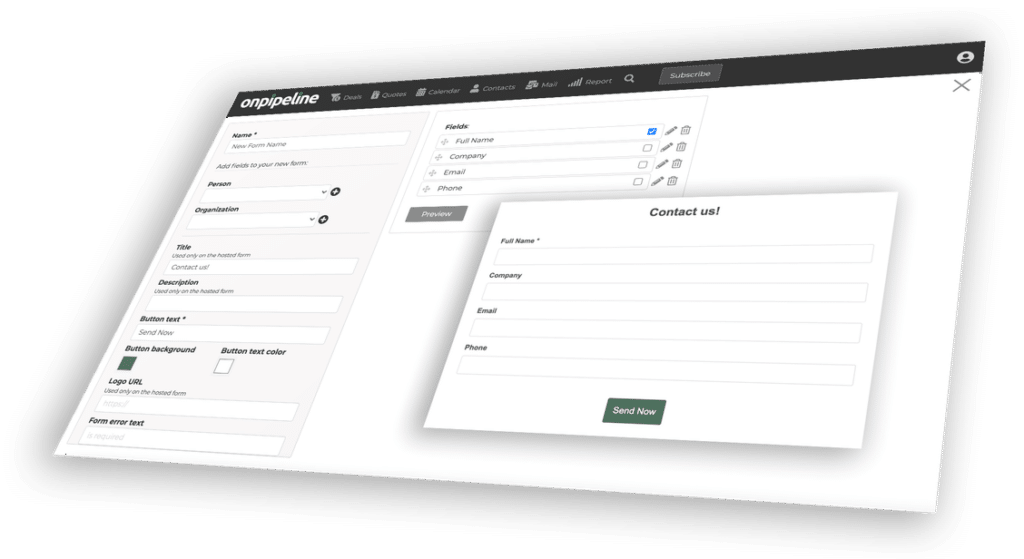
- Custom Field Builder: An intuitive interface where administrators can create new fields, define their data types (text, number, date, dropdown, etc.), set validation rules, and assign them to specific modules (e.g., adding a “Industry Segment” field to the Account module).
- Workflow Automation Engine: A visual or rule-based system that allows administrators to define triggers (e.g., a lead status change) and subsequent actions (e.g., send an email notification, assign a task, update a field). This engine should support conditional logic for more complex automation.
- Layout Customization: The ability for administrators to reorder, hide, or show fields on record pages and list views, tailoring the user interface to their team’s workflow.
- Template Management: Allowing administrators to create and manage email templates, document templates, and report templates that can be used across the system.
For example, a real estate agency might add custom fields like “Property Type,” “Square Footage,” and “Listing Price” to their opportunity module. They could also create a workflow that automatically assigns a follow-up task to a sales agent when a new lead expresses interest in a specific property type.
Managing Multiple Client Accounts Within a Single Instance
A key characteristic of SaaS CRMs is the ability to serve multiple distinct clients (tenants) from a single, shared infrastructure. This multi-tenancy architecture is crucial for cost-effectiveness and efficient resource utilization. The primary challenge lies in ensuring data isolation and security between tenants.Strategies for managing multiple client accounts include:
- Database Level Isolation: Each tenant can have its own dedicated database, or data can be segregated within a shared database using tenant IDs. The latter is more common for cost efficiency, requiring careful query design to filter data by tenant.
- Application Level Isolation: The application code itself must be designed to be tenant-aware. Every data access operation must be scoped to the current tenant’s context, preventing data leakage. This involves passing tenant identifiers throughout the request lifecycle.
- Configuration Management: Each tenant will have unique configurations (custom fields, workflows, branding, user settings). A robust configuration management system is needed to store and retrieve these tenant-specific settings.
- Resource Allocation: While infrastructure is shared, mechanisms may be in place to monitor and potentially throttle resource usage per tenant to prevent one tenant from impacting the performance of others.
A common implementation involves a “tenant ID” column on most database tables. When a user from Tenant A accesses data, all queries are automatically filtered to only return records where the `tenant_id` matches Tenant A’s ID. This is a critical security measure.
Implementing User Onboarding and Training Resources
Successful adoption of a SaaS CRM hinges on effective user onboarding and readily available training resources. New users, and even existing users transitioning to new features, need to understand how to leverage the CRM to its full potential.Key elements for user onboarding and training include:
- In-App Tutorials and Walkthroughs: Guided tours that introduce new users to the interface, key features, and essential first steps (e.g., adding a contact, creating a deal). These should be context-sensitive and appear when a user first encounters a new section.
- Knowledge Base and FAQs: A comprehensive, searchable repository of articles, guides, and frequently asked questions covering all aspects of the CRM’s functionality. This should be easily accessible from within the application.
- Video Demonstrations: Short, focused videos demonstrating specific tasks or features. These are highly effective for visual learners and can cover complex processes in an easy-to-digest format.
- Webinars and Live Training Sessions: Scheduled live sessions, both for initial onboarding and for introducing new features or advanced topics. These offer opportunities for real-time Q&A.
- Onboarding Checklists: A series of steps that new users can follow to ensure they are setting up their account correctly and have completed essential initial tasks.
- Dedicated Support Channels: Clear pathways for users to seek help, whether through email, chat, or a ticketing system.
For instance, when a new user first logs in, a modal could pop up offering a 5-minute guided tour of the dashboard and lead management section. Accompanying this, a link to a detailed article in the knowledge base about “Best Practices for Lead Management” would be provided.
Integrations and Extensibility
In today’s interconnected business landscape, a SaaS CRM’s true power is amplified through its ability to seamlessly connect with other essential tools and services. This section delves into how to build a CRM that is not only functional but also highly adaptable, allowing it to grow and evolve with the needs of its users.A robust SaaS CRM application should serve as a central hub for customer data and interactions, but its utility significantly expands when it can communicate and exchange information with a variety of other business systems.
This integration capability ensures a streamlined workflow, reduces manual data entry, and provides a more holistic view of the customer journey.
Common Third-Party Service Integrations
CRMs benefit immensely from integrating with a wide array of third-party services that support sales, marketing, customer support, and operational efficiency. These integrations automate processes, enrich data, and provide deeper insights.Commonly integrated third-party services include:
- Email Marketing Platforms: Services like Mailchimp, HubSpot Marketing Hub, or SendGrid allow for synchronized contact lists, campaign tracking, and automated email outreach directly from the CRM.
- Accounting Software: Integrating with platforms such as QuickBooks, Xero, or Zoho Books enables the synchronization of customer billing information, invoice tracking, and financial reporting.
- Customer Support Tools: Connecting with helpdesk software like Zendesk, Intercom, or Freshdesk allows for unified customer communication, ticket management, and a comprehensive view of support interactions within the customer’s CRM profile.
- Communication Tools: Integrations with VoIP services (e.g., RingCentral, Twilio) or team collaboration platforms (e.g., Slack, Microsoft Teams) facilitate click-to-call functionality, call logging, and in-app messaging.
- Project Management Software: Linking with tools like Asana, Trello, or Jira can provide visibility into project progress related to specific clients, enhancing collaboration between sales and project teams.
- E-commerce Platforms: For businesses selling online, integrating with platforms like Shopify, WooCommerce, or Magento allows for the synchronization of customer orders, purchase history, and product preferences.
- Social Media Management Tools: Connecting with services that manage social media presence can help track customer interactions and sentiment on social platforms, feeding this data into the CRM.
Technical Approaches for API Integrations
Building effective API integrations requires a well-defined strategy and adherence to best practices to ensure reliability, security, and maintainability. The choice of approach often depends on the complexity of the integration and the capabilities of the third-party service.The primary technical approaches for building API integrations include:
- RESTful APIs: This is the most common architectural style for web services. REST APIs use standard HTTP methods (GET, POST, PUT, DELETE) to interact with resources, making them intuitive and widely adopted. They typically use JSON or XML for data exchange.
- SOAP APIs: While less common for new integrations than REST, SOAP (Simple Object Access Protocol) is a protocol that uses XML for its message format and relies on other application layer protocols, most commonly HTTP or SMTP, for message negotiation and transmission. It is often used in enterprise-level applications requiring strict standards.
- Webhooks: These are automated messages sent from apps when something happens. They provide a way for one application to notify another application about an event in real-time. For example, when a new lead is created in a connected marketing tool, a webhook can instantly send this information to the CRM.
- OAuth 2.0 for Authentication: For secure access to user data, OAuth 2.0 is the industry standard. It allows users to grant third-party applications limited access to their data on another service without sharing their credentials.
- SDKs (Software Development Kits): Some third-party services provide SDKs that abstract away the complexities of their APIs, offering pre-built libraries and tools that simplify the integration process for developers.
Benefits of Offering a Plugin or App Marketplace
A plugin or app marketplace transforms a CRM from a standalone product into a dynamic ecosystem, offering significant advantages to both the CRM provider and its users. This approach fosters innovation and customizability.The benefits of offering a plugin or app marketplace are substantial:
- Enhanced Functionality: Users can extend the core capabilities of the CRM by adding specialized features and integrations tailored to their unique business needs without requiring custom development from the CRM vendor.
- Increased Customer Retention: A rich ecosystem of apps makes the CRM more indispensable to businesses, as they become reliant on the specialized tools and workflows available through the marketplace.
- New Revenue Streams: The marketplace can generate revenue through commission on app sales, premium app listings, or by charging developers for access to the platform.
- Faster Innovation: By empowering third-party developers, the CRM vendor can leverage external expertise and creativity to rapidly introduce new features and integrations, keeping the product competitive.
- Customization and Personalization: Businesses can tailor the CRM experience precisely to their industry, team structure, and specific operational processes, leading to higher adoption rates and user satisfaction.
- Reduced Development Burden: The CRM vendor can focus on core product development while the community contributes to specialized functionalities, reducing internal resource strain.
Best Practices for Designing a Robust and Well-Documented API
A well-designed and documented API is the cornerstone of a successful integration strategy and a thriving extensibility ecosystem. It ensures that developers can easily understand, connect to, and build upon the CRM’s capabilities.Key best practices for designing a robust and well-documented API include:
- Adhere to RESTful Principles: Design APIs using RESTful principles for statelessness, resource-based URLs, and standard HTTP methods. This makes the API predictable and easy to consume.
- Use Clear and Consistent Naming Conventions: Employ consistent and intuitive naming for endpoints, parameters, and data fields. For example, use plural nouns for collections (e.g., `/contacts`, `/companies`).
- Implement Strong Authentication and Authorization: Secure the API using industry-standard protocols like OAuth 2.0 and implement granular permission controls to ensure that users can only access the data and perform actions they are authorized for.
- Provide Comprehensive Error Handling: Return meaningful error codes and messages that clearly explain what went wrong and how to fix it. Use standard HTTP status codes (e.g., 400 for bad request, 401 for unauthorized, 404 for not found).
- Use Versioning: Implement API versioning from the outset (e.g., `/v1/contacts`, `/v2/contacts`) to allow for backward-compatible updates and to manage changes without disrupting existing integrations.
- Offer a Sandbox Environment: Provide a dedicated sandbox or staging environment where developers can test their integrations without affecting live production data.
- Maintain Thorough and Up-to-Date Documentation: Create comprehensive documentation that includes API reference guides, authentication instructions, example requests and responses, and tutorials. Keep the documentation synchronized with API changes.
- Include Rate Limiting: Implement rate limiting to protect the API from abuse and to ensure fair usage for all consumers. Clearly communicate these limits to developers.
- Design for Extensibility: Allow for custom fields and attributes to be added to resources, and provide mechanisms for developers to extend the functionality of existing resources through custom endpoints or hooks.
User Interface and Experience Design
Crafting a successful SaaS CRM application goes beyond robust functionality; it hinges on how users interact with the system. A well-designed User Interface (UI) and User Experience (UX) are paramount for adoption, efficiency, and overall customer satisfaction. This section delves into the critical aspects of designing an intuitive and effective UI/UX for your CRM.The goal is to create a system that is not only powerful but also a pleasure to use.
This involves a deep understanding of user needs, workflows, and the principles that guide effective digital product design. By focusing on these elements, you can ensure your CRM becomes an indispensable tool for your customers’ businesses.
Wireframing Key CRM Screens for Intuitive Navigation
Wireframing is an essential early step in the UI/UX design process. It allows for the rapid visualization and iteration of screen layouts and user flows without getting bogged down in visual details. For a CRM, this means meticulously planning how users will access and interact with core modules like contact management, deal pipelines, task management, and reporting.Effective wireframing focuses on information architecture and the placement of key elements.
This ensures that users can quickly find what they need and understand how to perform common tasks.
- Dashboard: A central hub providing a high-level overview of key metrics, upcoming tasks, and recent activity. Wireframes should consider customizable widgets and clear calls to action.
- Contact/Company Profiles: These screens need to present a wealth of information in an organized manner. Wireframes should explore tabbed interfaces or collapsible sections for details like contact information, communication history, associated deals, and notes.
- Deal Pipeline: Visualizing the sales process is crucial. Wireframes should explore Kanban-style boards with drag-and-drop functionality, or list views with clear status indicators.
- Task Management: Users need to easily create, assign, and track tasks. Wireframes should consider calendar views, list views, and priority indicators.
- Reporting and Analytics: This section requires careful planning to ensure users can easily access and understand their data. Wireframes should consider filter options, chart types, and export functionalities.
Principles of Responsive Design for Cross-Device Usability
In today’s multi-device world, ensuring your SaaS CRM is accessible and usable on desktops, tablets, and mobile phones is non-negotiable. Responsive design is the approach that allows your application’s layout and content to adapt fluidly to different screen sizes and resolutions. This provides a consistent and optimized experience regardless of the device being used.Adhering to responsive design principles not only enhances usability but also improves search engine optimization () and broadens your potential user base.
- Fluid Grids: Instead of fixed-width layouts, use relative units (percentages) for widths and margins, allowing elements to resize proportionally.
- Flexible Images: Images should be scaled within their containing elements to prevent overflow and maintain aspect ratios. This is often achieved with CSS properties like `max-width: 100%;`.
- Media Queries: These CSS rules allow you to apply different styles based on device characteristics, such as screen width, orientation, and resolution. This is how you tailor the layout for specific breakpoints.
- Mobile-First Approach: Designing for the smallest screens first and then progressively enhancing for larger screens often leads to a more streamlined and efficient experience across all devices.
- Touch-Friendly Interactions: Ensure buttons and interactive elements are large enough and have sufficient spacing for easy tapping on touchscreens.
Examples of Effective Data Visualization for CRM Reports
Data visualization transforms raw data into understandable and actionable insights. For a CRM, effective visualizations can highlight sales trends, identify bottlenecks in the sales process, and showcase customer engagement. The choice of visualization depends on the type of data and the message you want to convey.Well-designed charts and graphs empower users to make informed decisions quickly.
- Sales Pipeline Stages (Funnel Chart): A funnel chart is ideal for visualizing the progression of leads through different stages of the sales pipeline. Each stage is represented by a segment, with the width of the segment indicating the number of leads or deals at that stage. This clearly shows conversion rates and potential drop-off points. For instance, a CRM might show 100 leads in “Prospecting,” 50 in “Qualified,” 25 in “Proposal Sent,” and 10 in “Closed Won.”
- Sales Performance Over Time (Line Chart): A line chart is excellent for tracking sales revenue, number of deals closed, or average deal value over a specific period (e.g., monthly, quarterly, annually). This helps identify seasonal trends and growth patterns. A line graph might show a steady increase in monthly revenue from $10,000 to $50,000 over a year.
- Deal Distribution by Source (Bar Chart): A bar chart can effectively compare the number of deals or revenue generated from different lead sources (e.g., website, referrals, events). This helps allocate marketing and sales resources more effectively. A bar chart could show that “Website” generated 30 deals, “Referrals” 20, and “Events” 15.
- Customer Segmentation (Pie Chart or Donut Chart): These charts are useful for showing the proportion of customers within different segments (e.g., by industry, customer size, or subscription tier). For example, a pie chart might illustrate that 40% of customers are in the “Small Business” segment, 35% in “Mid-Market,” and 25% in “Enterprise.”
The Importance of Accessibility in Web Application Design
Accessibility in web application design means ensuring that people with disabilities can perceive, understand, navigate, and interact with your CRM. This includes individuals with visual, auditory, motor, and cognitive impairments. Building an accessible application is not only an ethical imperative but also a legal requirement in many regions and expands your potential user base.An accessible design benefits everyone by promoting clearer content, more predictable navigation, and a more inclusive user experience.
- Semantic HTML: Using proper HTML elements (e.g., headings, lists, buttons) provides structure that screen readers can interpret, allowing visually impaired users to navigate content effectively.
- Keyboard Navigation: All interactive elements should be focusable and operable using only a keyboard. This is crucial for users who cannot use a mouse. The tab order should be logical and predictable.
- Sufficient Color Contrast: Text and interactive elements must have adequate contrast against their background to be readable by users with low vision or color blindness. Tools like the Web Content Accessibility Guidelines (WCAG) contrast checker can be used to verify compliance.
- Alternative Text for Images: Providing descriptive `alt` text for images allows screen readers to convey the image’s content or function to users who cannot see it.
- Clear and Concise Language: Using simple, straightforward language and avoiding jargon makes the application easier to understand for users with cognitive disabilities or those who are not native speakers.
- Focus Indicators: Visible focus indicators (Artikels or highlights) are essential to show users which element currently has keyboard focus, guiding them through the interface.
Security and Data Privacy
Building a robust SaaS CRM application necessitates a paramount focus on security and data privacy. Protecting sensitive customer information is not merely a technical requirement but a fundamental ethical and legal obligation. A breach in security can lead to severe reputational damage, financial penalties, and a loss of customer trust, all of which can be detrimental to the success of your SaaS venture.
Therefore, integrating security measures from the ground up is crucial.The core principles of security revolve around confidentiality, integrity, and availability. Confidentiality ensures that data is accessible only to authorized individuals. Integrity guarantees that data remains accurate and unaltered, preventing unauthorized modifications. Availability ensures that authorized users can access the data and the application when they need it. Adhering to these principles forms the bedrock of a secure SaaS CRM.
Data Encryption
Implementing robust encryption strategies is essential for safeguarding data both when it is stored and when it is being transmitted. Encryption transforms readable data into an unreadable format, requiring a specific key to decrypt it. This process significantly mitigates the risk of data exposure even if unauthorized access to storage or communication channels occurs.Methods for data encryption include:
- Encryption at Rest: This involves encrypting data stored on databases, servers, and backup media. Common techniques include Transparent Data Encryption (TDE) for databases, which encrypts the entire database files, and file-level encryption for individual files. The choice of encryption algorithms, such as AES-256, is critical for strong security.
- Encryption in Transit: This protects data as it travels across networks, such as between the user’s browser and the CRM server, or between different microservices within the application. Protocols like TLS/SSL (Transport Layer Security/Secure Sockets Layer) are standard for encrypting HTTP traffic, ensuring that data exchanged over the internet is protected from eavesdropping.
Compliance Requirements
Navigating the complex landscape of data privacy regulations is a non-negotiable aspect of developing and operating a SaaS CRM. Adherence to these regulations is vital for legal operation and for building trust with your user base, especially when dealing with customers from different geographical regions.Key compliance frameworks that a SaaS CRM must consider include:
- General Data Protection Regulation (GDPR): This European Union regulation provides strict guidelines on how personal data of EU residents must be processed and protected. It grants individuals significant rights over their data, including the right to access, rectify, and erase their personal information.
- California Consumer Privacy Act (CCPA): Similar to GDPR, CCPA grants California consumers rights regarding their personal information collected by businesses. It focuses on transparency, consumer control, and business accountability.
Meeting these compliance requirements often involves implementing features like data access controls, consent management, and mechanisms for handling data subject requests. Regular audits and assessments are also crucial to ensure ongoing compliance.
Secure Data Backups and Disaster Recovery
Ensuring the availability and integrity of data in the event of unforeseen circumstances is a critical component of a comprehensive security strategy. Secure data backups and a well-defined disaster recovery plan are essential to minimize downtime and data loss, thereby maintaining business continuity.Strategies for secure data backups and disaster recovery include:
- Regular and Automated Backups: Implement a schedule for frequent, automated backups of all critical data. The frequency of backups should align with the acceptable data loss tolerance (Recovery Point Objective – RPO).
- Offsite and Encrypted Storage: Store backup copies in geographically separate locations to protect against site-specific disasters. Ensure these backups are encrypted to maintain confidentiality.
- Disaster Recovery Plan (DRP): Develop a detailed plan outlining the steps to restore operations after a disaster. This plan should include roles and responsibilities, communication protocols, and tested recovery procedures.
- Regular Testing: Periodically test the backup and recovery processes to ensure their effectiveness and to identify any potential issues before a real disaster strikes. This validation is crucial for a reliable recovery.
A robust disaster recovery strategy not only protects against data loss but also demonstrates a commitment to service reliability, which is highly valued by SaaS customers.
Monetization and Business Models

Successfully monetizing a SaaS CRM application is crucial for its sustainability and growth. This involves carefully selecting pricing strategies that align with the value provided to customers and considering the entire customer journey from acquisition to long-term retention. Understanding these aspects will shape your revenue streams and overall business success.Developing a robust monetization strategy requires a deep understanding of your target market, the value your CRM delivers, and competitive landscape.
It’s not just about setting a price; it’s about creating a sustainable model that encourages customer acquisition, fosters loyalty, and drives revenue growth.
SaaS Pricing Models Comparison
Choosing the right pricing model is a foundational decision for any SaaS business. Each model offers distinct advantages and caters to different customer segments and usage patterns. Understanding these differences allows for a strategic approach to revenue generation.Here’s a comparison of common SaaS pricing models:
- Tiered Pricing: This model offers different service levels or packages at varying price points, each with a distinct set of features, usage limits, or support levels. This allows businesses to choose a plan that best fits their current needs and budget, with the option to upgrade as they grow. For example, a CRM might offer a “Starter” tier with basic contact management, a “Professional” tier with automation and reporting, and an “Enterprise” tier with advanced customization and dedicated support.
- Per-User Pricing: In this model, customers are charged based on the number of active users within their organization who access the CRM. This is a straightforward and predictable model, especially for CRMs where the value is directly tied to individual user adoption and activity. A common example is a per-user per-month fee, such as $25 per user per month for a sales team.
- Feature-Based Pricing: This approach charges customers based on the specific features or modules they choose to use within the CRM. It offers granular control and flexibility, allowing customers to pay only for what they need. For instance, a CRM might offer core contact and deal management for a base price, with add-ons for marketing automation, advanced analytics, or project management at additional costs.
-
Usage-Based Pricing (Pay-as-you-go): Customers are billed based on their actual consumption of specific resources or services, such as the number of contacts stored, emails sent, or API calls made. This model can be very attractive to businesses with variable needs or those just starting out, as it aligns costs directly with value received.
An example could be charging per 1,000 contacts managed or per 10,000 API requests.
- Hybrid Models: Many successful SaaS companies combine elements of these models to create a more comprehensive and appealing offering. For example, a tiered model might also incorporate per-user fees within each tier or offer feature add-ons to higher tiers.
Free Trials and Freemium Strategies
Offering a way for potential customers to experience your CRM before committing financially is a powerful acquisition tool. Free trials provide time-limited access to premium features, while freemium models offer a permanently free, albeit limited, version of the product.
Free Trials: These are typically time-bound (e.g., 7, 14, or 30 days) and grant full access to a chosen plan or the entire feature set. The goal is to allow users to experience the full value proposition and integrate the CRM into their workflows, thereby increasing the likelihood of conversion. Effective free trial strategies include:
- Onboarding Support: Providing guided tours, tutorials, and proactive outreach to help users get the most out of their trial period.
- Clear Value Demonstration: Highlighting key features and benefits that directly address common pain points.
- Seamless Upgrade Path: Making it easy for users to transition to a paid plan at the end of their trial.
- Data Retention: Allowing users to retain their trial data if they decide to convert to a paid plan.
Freemium Versions: A freemium model offers a basic, perpetually free version of the CRM with limited features, usage, or support. This can attract a large user base and serve as a lead generation engine for paid plans. Success factors include:
- Generous Core Functionality: The free version must offer enough value to be useful for a significant segment of the target market.
- Clear Upgrade Incentives: The limitations of the free version should naturally lead users to seek more advanced features available in paid tiers.
- Scalability: The infrastructure must be able to handle a large volume of free users efficiently.
- Targeted Upselling: Strategies to identify and engage free users who show potential for conversion.
A well-known example of a freemium strategy in the productivity space is Slack, which offers a free tier with limitations on message history and integrations, encouraging businesses to upgrade for more comprehensive features.
Customer Lifecycle and Retention Strategies
The customer lifecycle encompasses all stages of a customer’s relationship with your CRM, from initial awareness to becoming a loyal advocate. Effective retention strategies are vital for long-term profitability, as acquiring new customers is generally more expensive than retaining existing ones.The customer lifecycle can be broadly categorized into:
- Awareness: Potential customers learn about your CRM through marketing efforts.
- Acquisition: Prospects engage with your CRM, perhaps through a free trial or demo.
- Onboarding: New customers are guided through setup and initial usage.
- Adoption: Customers actively use the CRM and integrate it into their daily operations.
- Expansion: Customers upgrade to higher tiers, add more users, or purchase additional features.
- Advocacy: Satisfied customers refer new business and provide positive feedback.
- Churn: Customers discontinue their subscription.
Strategies to enhance retention include:
- Proactive Customer Success: Dedicated customer success managers who work with clients to ensure they are achieving their desired outcomes with the CRM. This involves regular check-ins, performance reviews, and strategic guidance.
- Continuous Value Delivery: Regularly releasing new features, improvements, and educational content that keeps the CRM relevant and valuable to users.
- Exceptional Customer Support: Providing timely, efficient, and helpful support across multiple channels.
- Feedback Loops: Actively soliciting and acting upon customer feedback to improve the product and service.
- Loyalty Programs and Incentives: Rewarding long-term customers with discounts, early access to new features, or exclusive content.
- Community Building: Fostering a user community where customers can share best practices, ask questions, and support each other.
A prime example of strong customer retention is Adobe Creative Cloud, which leverages its subscription model to continuously add value through regular updates and new software releases, making it difficult for users to switch to alternative, less integrated solutions.
Customer Support and Success Management
Effective customer support and success management are not merely operational functions; they are strategic pillars that directly impact customer satisfaction, retention, and revenue. They are the frontline of your customer relationship, ensuring users derive maximum value from your CRM.Considerations for managing customer support and success include:
- Defining Service Level Agreements (SLAs): Establishing clear expectations for response times and resolution times for different types of inquiries. For instance, a critical issue might have a 1-hour response SLA, while a general inquiry might have a 24-hour SLA.
- Multi-Channel Support: Offering support through various channels such as email, phone, live chat, and a comprehensive knowledge base or help center. This caters to diverse customer preferences.
- Empowering Support Teams: Providing support agents with the necessary tools, training, and access to customer data to resolve issues efficiently and empathetically. This includes CRM integration for support staff to view customer history and context.
- Proactive Engagement: Moving beyond reactive problem-solving to proactively identify potential issues or opportunities for improvement for customers. This could involve monitoring usage patterns to detect low adoption or offering personalized tips.
- Customer Success Metrics: Tracking key performance indicators (KPIs) such as Net Promoter Score (NPS), Customer Satisfaction (CSAT), churn rate, and customer lifetime value (CLTV) to measure the effectiveness of support and success efforts.
- Knowledge Management: Building and maintaining a robust knowledge base with FAQs, tutorials, and troubleshooting guides that empowers customers to find solutions independently.
- Escalation Procedures: Implementing clear protocols for escalating complex or urgent issues to specialized teams or senior staff to ensure timely resolution.
- Feedback Integration: Systematically collecting feedback from support interactions and using it to inform product development and process improvements.
Companies like HubSpot are renowned for their extensive customer support resources, including a vast knowledge base, community forums, and dedicated customer success teams, which contribute significantly to their high customer retention rates.
Closure
In conclusion, building a SaaS CRM application is a multifaceted yet rewarding undertaking that blends strategic planning with technical expertise. By meticulously following the Artikeld steps, from understanding core principles and designing intuitive interfaces to implementing robust security measures and planning for scalability, you can successfully create a valuable tool that empowers businesses. This journey equips you with the knowledge to not only develop a functional application but also to foster client success and drive sustainable business growth through effective customer relationship management.